A colorway is easier to judge when each color has a job. Start with a base that covers the largest areas, a secondary color that separates adjoining panels, and an accent that points to one small detail. You can add complexity later, after the silhouette reads clearly.
Build a palette against the whole shoe
Try the base on the side panel first, then choose the toe and sole together. Two colors that look distinct as swatches may blend when they touch along a narrow edge. Look at the shoe at a small size as well as close up; a design that depends on a tiny detail may lose its intended balance when viewed from farther away.
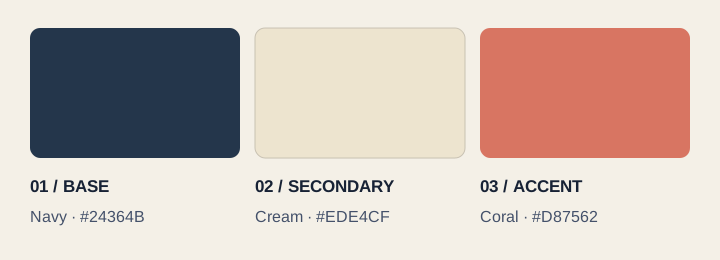
In Kicks, choose Custom Color to enter a different shade using your browser's color picker. Record the hex value in your notes if the palette must be reproduced in another drawing. Keep alternate colorways as separately named project files so you can compare them without losing the original.
Use material labels as intentions
Choose the proposed material before filling a region. This associates the fill with a material label in the design information. It is a way to record “canvas on the side panel” or “rubber on the sole”; it does not simulate how the material will bend, breathe, wear or accept a dye.
Be precise in the handoff notes about what remains open. “Cream textile, exact weave and weight to be selected” is more useful than a broad label that appears final. When a supplier proposes a material, ask for its specification and a physical swatch. Confirm finish and shade on that actual material before approving it.
| Record in Kicks | Resolve during development |
|---|---|
| Panel name, intended material and display color. | Supplier reference, composition, thickness or weight, finish and tolerances. |
| Where a pattern begins and its intended direction. | Print method, repeat dimensions, artwork resolution and seam alignment. |
| Logo artwork and its approximate position. | Physical dimensions, application method, placement tolerance and a sample approval. |
Treat on-screen color references carefully
The editor's labeled palette and optional reference field help communicate a choice. Kicks does not certify the accuracy of a screen-to-Pantone match. A display color depends on the screen and the image, while a physical material also depends on its surface and lighting.
If you use a named color system, verify the code against the current physical reference for the relevant material and state the system in your specification. Leave the reference blank or write “to be confirmed” when you have not checked it. Do not assign the nearest-looking code and present it as an approved production match.
Review consistency across views
Check the outside, inside, top and back in sequence. A panel that wraps around the heel should have a consistent label wherever it appears. If the sides intentionally differ, add a note explaining the difference. A final colorway review should identify every unconfirmed choice before the concept is sent to a developer.